
QR memorials
The product page: the plaque, the memorial and how they connect.
Graves and QR
Fitting a code to a grave is technically straightforward. The part families are rarely told about is the permission, the placement rules and what a stranger sees when they scan it. All three are worth settling before you order anything.

It is a small code fixed to a grave, headstone or memorial that anyone can scan with a phone camera. The scan opens an online page about the person buried there — with Moments by QR, a digital memorial holding their story, photographs and family, shown according to the privacy setting the family chose.
Technically yes — a QR plaque is small and can be fixed to most memorials. Whether you are permitted to is a separate question, decided by the cemetery or burial authority responsible for that ground. Rules vary between them, so check before buying or attaching anything.
The permission side is set out in full in cemetery rules explained. This page covers how the code itself works.
It links the resting place to a digital memorial. Scanning it opens a page about the person, so the grave stops being only a name and two dates for anyone who did not know them.
In the Moments by QR case, the plaque is 5cm × 5cm and matte black, and it is optional — a Memorial Page functions perfectly well with no plaque at all. The code has no memory of its own: change nothing physical, and the memorial behind it can keep growing for years.
The phone opens the memorial the code points to, and what the visitor can see follows that memorial's privacy setting.
No app is needed to read a QR code — every modern phone camera does it.
The code itself contains nothing about the person; it is only an address.
A public memorial opens directly. A private, PIN-protected memorial asks for the PIN. A scan never overrides the setting the family chose.
A Moments by QR Memorial Page is structured rather than a single obituary: Overview, Biography, Timeline, Gallery, Family Tree, Tribute Book and Grave Location.
Those sections exist because families rarely know where to begin. Prompted structure gets a life written down; a blank text box usually does not. On This Day notifications and custom reminders bring the memorial back to the family over time rather than leaving it as an archive nobody reopens. A fuller walk-through is in how digital memorials work.
We deliberately do not prescribe a position. Burial grounds differ on what may be attached to a headstone, a base, a kerb or the ground itself, and some do not permit additions at all. The placement rules that apply are the ones your burial ground publishes.
Where fixing is permitted, many grounds also have views on who may carry out the work — often a registered memorial mason. Ask about that in the same conversation as permission.
No. A QR code is a digital link and, at most, an optional addition to an existing memorial. It marks nothing on its own, carries no inscription, and is not a substitute for a headstone or grave marker of any kind.
That distinction matters for families whose traditions shape what a grave looks like — including those who keep graves plain by choice. A memorial can be created and used with no physical marker involved at all.
Only if the family chooses that. A memorial can be public, public with role and access controls, or private and PIN-protected — and the plaque does not change which of those applies.
This is worth deciding before the code goes anywhere public: a plaque in a cemetery can be scanned by anyone passing. How the privacy modes and family roles work.
Work through these in order. The first two decide whether the rest matters.
We are not in a position to tell you what your burial ground allows, who it recognises as the authorised person, or how long any plaque will last outdoors. Those answers come from the cemetery and from the mason.
The grave marks where someone rests and gives the family a place to return to and visit. A connected digital memorial sits alongside it, giving relatives somewhere to keep more of the person's story — their memories, photographs and family — for the generations who come after.
One does not stand in for the other; the code simply links them. What that space looks like when it is built around Muslim families is set out in Muslim digital memorials, and there is a finished example memorial to walk through.
Create the Memorial Page, choose who can see it, and add the optional plaque once the burial ground has confirmed what is permitted.
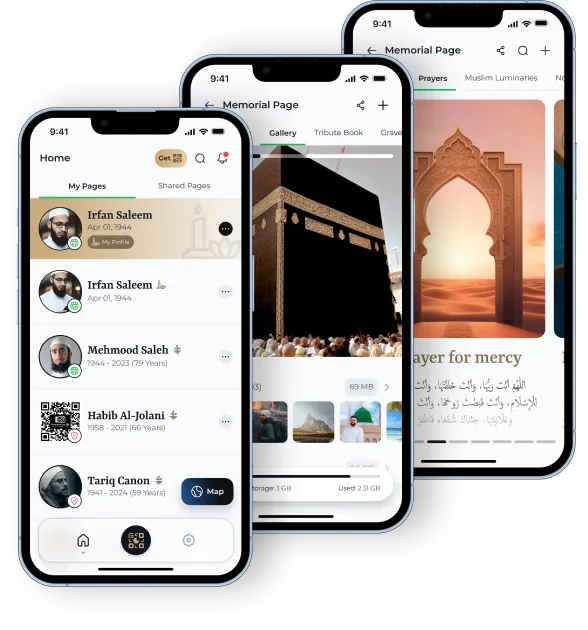
Moments by QR states product facts about its own service from first-party product information, cites official primary sources for anything statutory or operational, and leaves questions it cannot evidence visibly unanswered rather than guessing.
The product page: the plaque, the memorial and how they connect.
Who decides, how grounds differ, and what to do if refused.
Muslim grave markers in the UK: practice, rules and what to ask a scholar.